A way to set up remote MCP servers for Claude
A small effort of myself to learn about MCP servers and how to deploy them securely.
Introduction
How are we connecting to an MCP server?
Normally if the external tool or datasources provide a remote MCP server, we can easily configure our coding agents such as Claude Code or Codex to connect to the remote MCP server. However, many other tools only provide the MCP server source code including some instructions to run it locally.
There are many problems with local MCP servers and here are some of them:
- For normal users:
- We need to run the MCP server locally: More things to install, more dependencies to manage, different servers require different setup, etc.
- For enterprise:
- Waste of resource and lack of standardized setup: Everyone spins up their own MCP servers with different configuration
- Security risk: Untrusted MCP servers downloaded from internet can be misconfigured or contain malicious configuration and pose a critical threat to user and organization data.
As a DevOps or Platform engineer, we are usually tasked with standardizing the deployment process and consolidating scattered setups. In my homelab environment, I have several tools running and each of them provides their own MCP server. I also have 3 devices I want to connect to those MCP servers, and that would be a nightmare to set them up on each device.
So I created one problem for myself: Configure once, run everywhere.
Architecture Overview
I have a Kubernetes cluster running in my homelab to mimic enterprise environment.
We can deploy MCP servers on a VM like we usually do with normal HTTP servers. But since most of the workload nowadays are containers, my homelab Kubernetes cluster is an ideal candidate for the deployment.
Here is the simplified version of my current architecture:
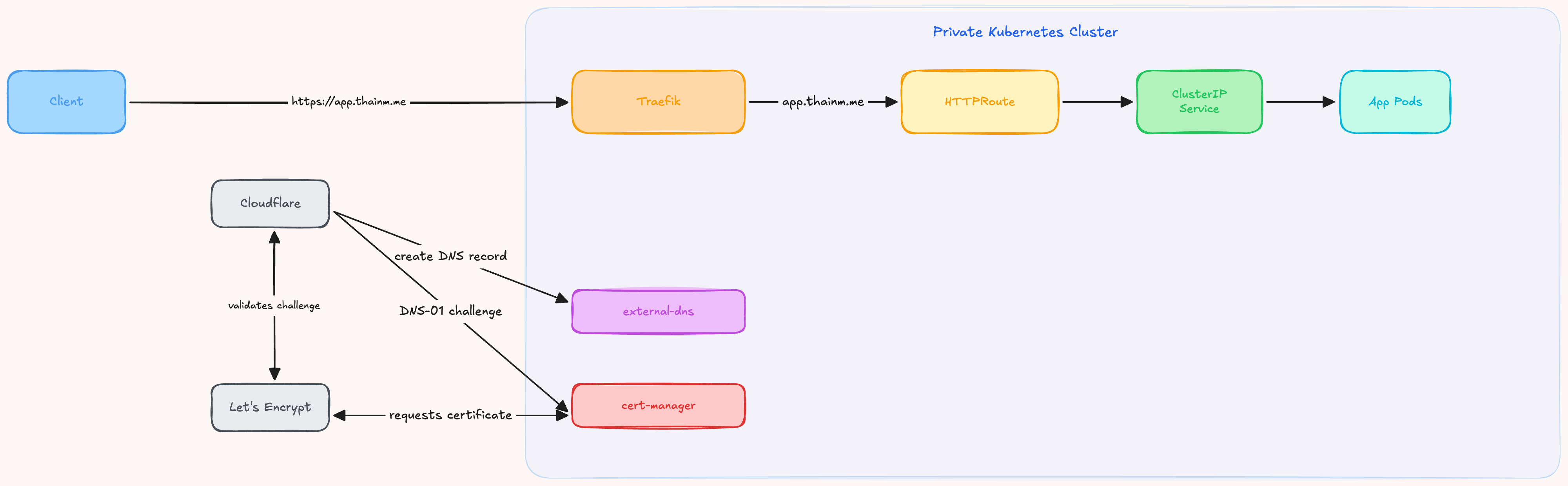
A pretty standard setup:
- Traefik with Gateway API acts as a reverse proxy for TLS termination
- External DNS watches HTTPRoute resources to create A records on Cloudflare automatically. LAN devices can resolve and connect to Traefik Load Balancer’s private IP
- Cert Manager requests TLS certificate from Let’s Encrypt for public domains/sub-domains
There is one problem with this setup: According to Anthropic official documentation, Claude applications such as Claude on the Web or Claude Desktop app requires that the remote MCP server need to be publicly reachable.
So we will need to expose our MCP server publicly (and securely).
I love Excalidraw (an open-source tool to sketch diagrams) and use it quite often. So I’m going to deploy its MCP server into my cluster.
Solution
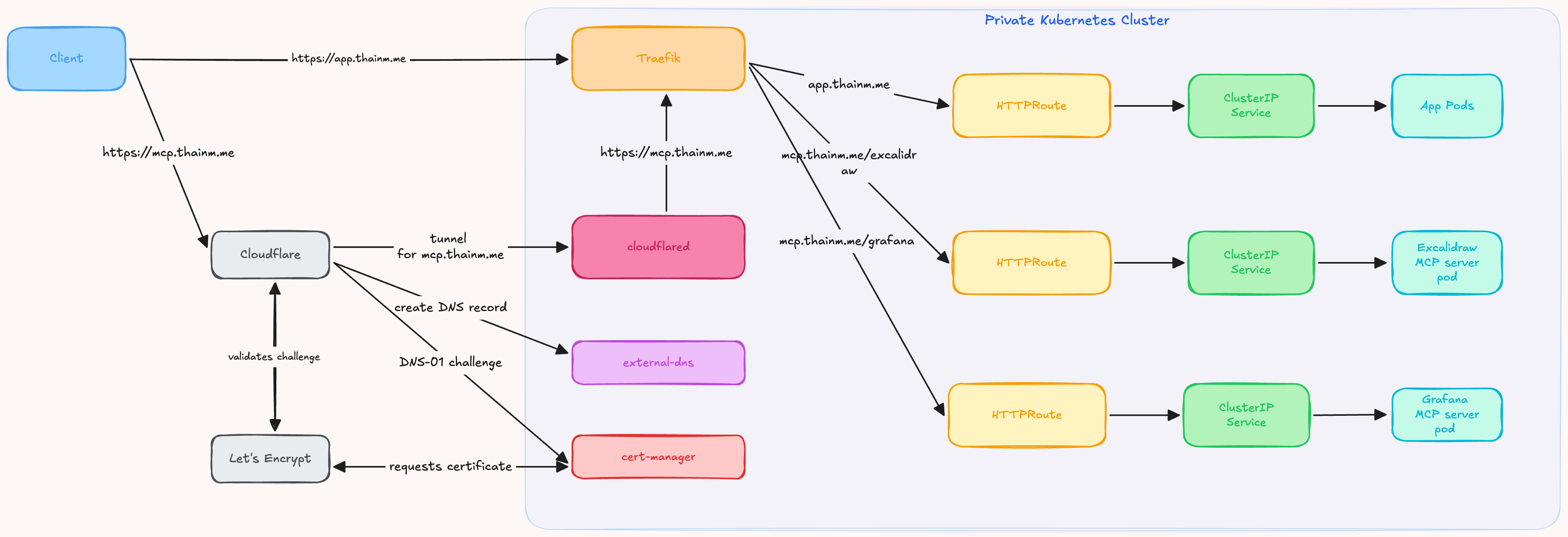
Since I’m already using Cloudflare extensively, I decided to use Cloudflare Tunnel to expose MCP servers.
Cloudflare Tunnel can forward the traffic to pods, but I want my Traefik to remain my only entrypoint in the cluster (for the sake of observability and security), I decided to configure the tunnel to forward to Traefik instead of pods. Also, I want to have only one domain for all MCP servers, so Traefik should be configured to route requests to upstream services based on request path.
First, we will need to:
- Containerize Excalidraw MCP server. The MCP server source code does not include any Dockerfile, but we can easily create one by asking Claude
- Build and upload the container image to an image registry
- Deploy the Excalidraw MCP server to the Kubernetes cluster with 1 Deployment, 1 ClusterIP Service, 1 HTTPRoute. The HTTPRoute resource should be configured to accept traffic to
mcp.thainm.mewith/excalidrawrequest path.
Here is the Dockerfile I used:
FROM node:22-slim AS builder

RUN apt-get update \
    && apt-get install -y --no-install-recommends curl ca-certificates unzip \
    && rm -rf /var/lib/apt/lists/* \
    && corepack enable \
    && corepack prepare pnpm@10.11.0 --activate \
    && curl -fsSL https://bun.sh/install | bash

ENV PATH="/root/.bun/bin:${PATH}"

WORKDIR /app

COPY package.json pnpm-lock.yaml .npmrc ./
RUN pnpm install --frozen-lockfile

COPY . .
RUN pnpm run build

# ---

FROM node:22-slim AS runtime

ENV NODE_ENV=production \
    PORT=3001

WORKDIR /app

COPY --from=builder /app/dist ./dist

EXPOSE 3001

CMD ["node", "dist/index.js"]
Next, I will need to configure Cloudflare:
- Create a tunnel
- Deploy
cloudflaredinto the Kubernetes cluster and configure it to connect to my Cloudflare account - Configure the tunnel:
- Tunnel hostname:
mcp.thainm.me - Upstream service URL (this is for cloudflared to forward the traffic): https://thefatcat-traefik.traefik.svc.cluster.local:443
- Tunnel hostname:
That’s normally the case, but if we connect to the remote MCP server now, it will fail.
The reason is: You can see the upstream service URL is targeting Traefik using HTTPS. During the TLS handshake, Cloudflare Tunnel (cloudflared) connects to upstream service (Traefik) with Traefik’s Kubernetes FQDN as SNI value.
My Traefik is serving 2 TLS certificates: a Let’s Encrypt certificate for *.thainm.me and a self-signed certificate for everything else.
This means when Traefik receives the connection from cloudflared, it does not recognize the domain so it falls back to the self-signed certificate. When cloudflared gets the certificate from Traefik, it checks if the certificate matches the requested domain (mcp.thainm.me). It does not match, so cloudflared stops the connection to prevent the client from connecting to the wrong server.
So we need to do an extra step:
- In Cloudflare Zero Trust, we open Networks > Tunnel & Mesh > Choose Edit on the tunnel we created
- Under TLS setting, change the value of Origin Server Name to
mcp.thainm.me
After that, we can now connect to our remote Excalidraw MCP server from anywhere (with internet access of course :D)